
Personal finance · works offline

Your money, kept on your phone.

FinNet tracks what you spend, warns you before a budget runs out, posts your bills on time, and answers questions about your own numbers. No account to make. Nothing uploaded. It works without a signal.

  • No account
  • Encrypted on your phone
  • Works offline
  • English & Hinglish

Free to use. FinNet Pro adds automatic backup, voice and bill scan — 7 days free.

Fo

Food

₹8,200 of ₹10,000

82% Near limit

Fynni saysTry it: tap an amount, pick a budget, then save.

How much did you spend? ₹0

This runs in your browser — nothing is sent.

What it does

A month of money, handled on your phone.

Spending, budgets, bills, goals and what friends owe you — each one updates the others the moment you log a spend.

Budgets

Budgets that speak up before you overspend

Set a monthly limit for each category and choose when you want a warning. Every spend moves the bar at once, and a category close to its limit turns amber before it turns red.

  • A warning at the percentage you choose — 70%, say
  • What's left for the rest of the month, always on screen
  • Over-budget categories flagged on Home and in Budgets

Fynni saysCareful — Entertainment has gone over by ₹150. Want me to move some across?
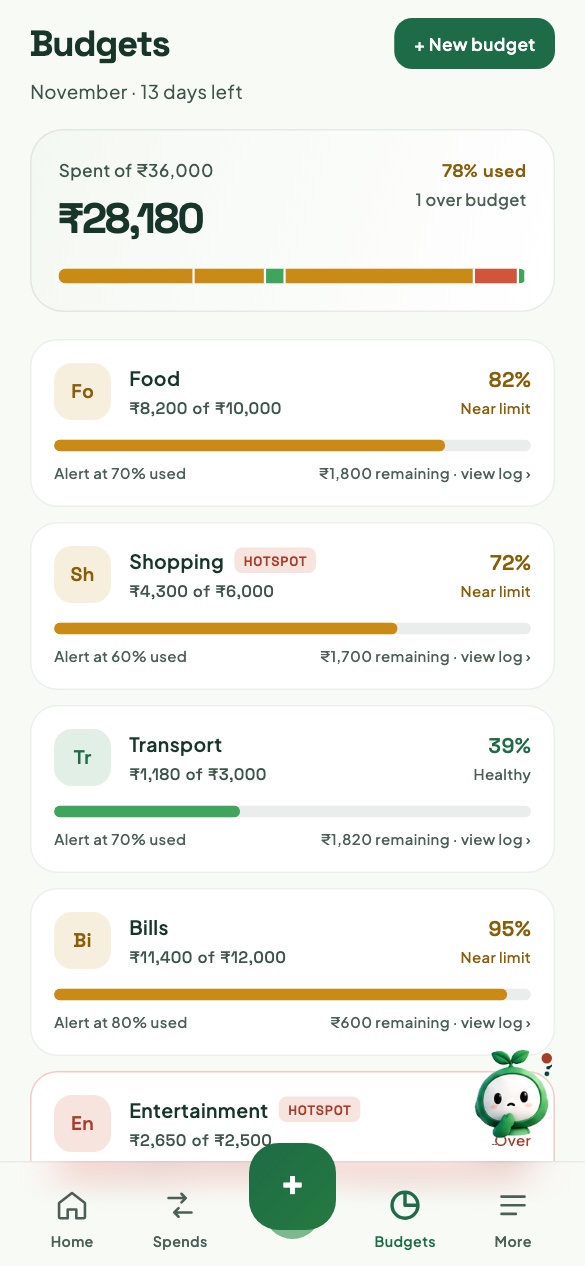

The Budgets screen: ₹28,180 spent of ₹36,000, with Food at 82% and Shopping at 72%, both near their limits.

Bills & EMIs

Bills that post themselves

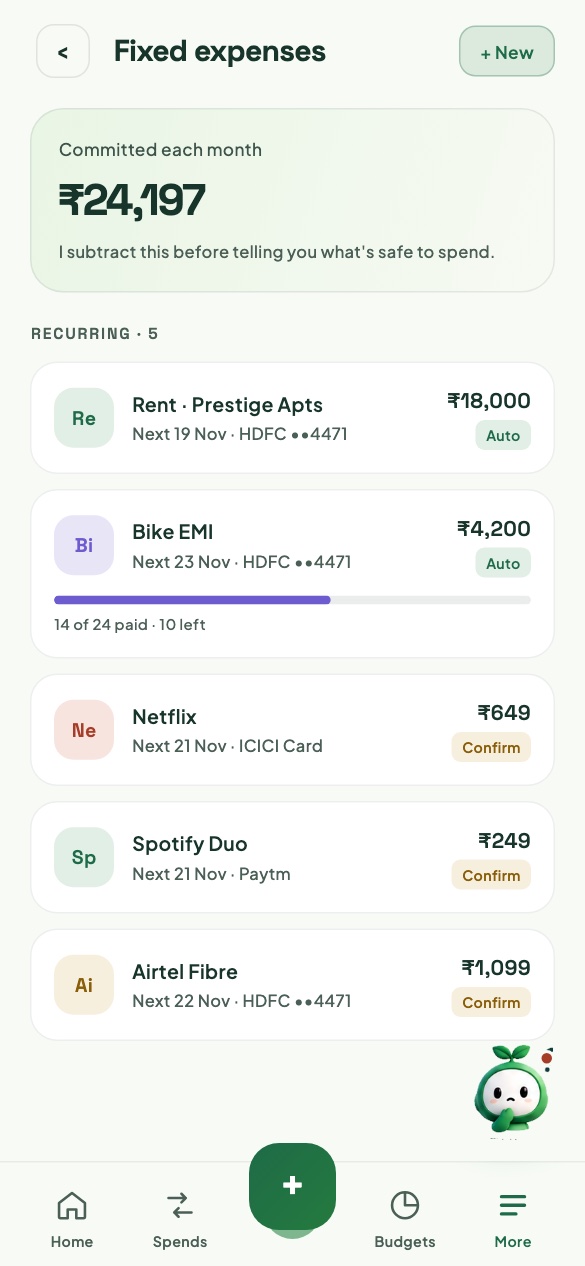
Rent, subscriptions and EMIs post on their due date — or wait for your tap, if you'd rather confirm. FinNet sets them aside before it tells you what's safe to spend.

  • Post automatically or confirm first, bill by bill
  • EMIs count down: 14 of 24 paid, 10 left
  • A reminder the evening before and the morning of — never between 10 pm and 8 am

Fynni says₹24,197 is committed each month. I take it off before telling you what's safe to spend.

The Fixed expenses screen: ₹24,197 committed each month — rent, a bike EMI 14 of 24 paid, Netflix, Spotify and Airtel Fibre.

Goals

Goals you can watch move

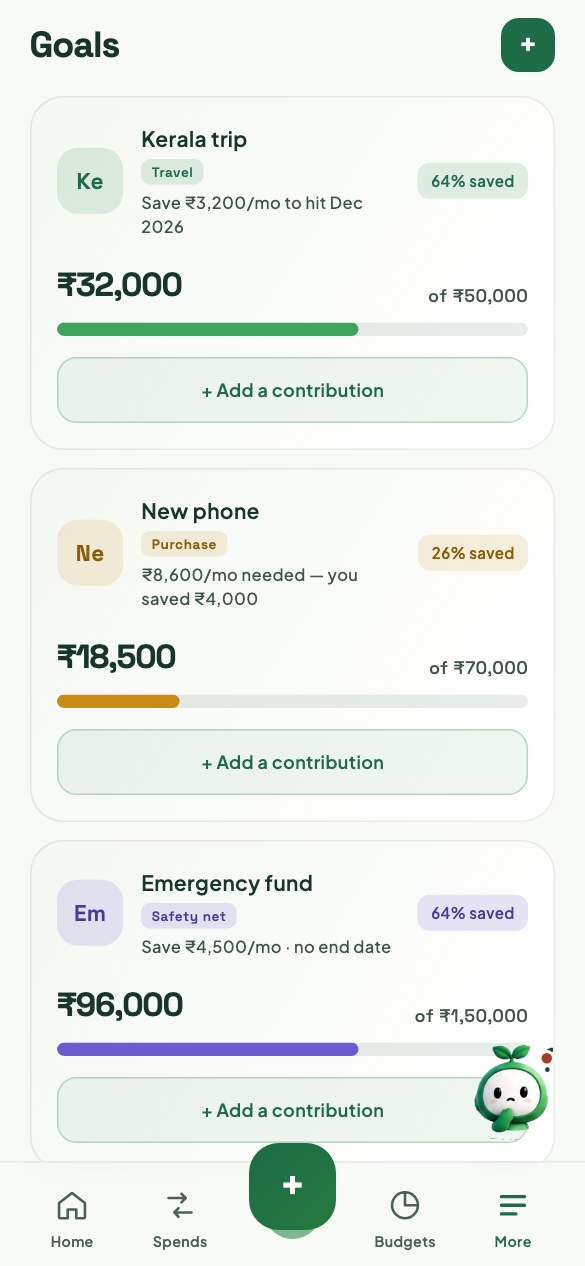
Name what you're saving for and the amount you need. FinNet works out the monthly pace from what you've actually put in, and moving money across takes a tap.

  • A monthly pace from your real contributions
  • Trips, purchases and an emergency fund, side by side
  • Counted in your net worth on Home

Fynni saysSave ₹3,200 a month and the Kerala trip is covered by December.

The Goals screen: Kerala trip 64% saved, New phone 26% saved, Emergency fund 64% saved.

Fynni

Ask about your money in your own words

Fynni reads your accounts, budgets, bills and goals together, so every answer carries your real figures — worked out on your phone. Ask in English or in Hinglish.

  • Every number comes from your own entries
  • Understands “kitna kharcha hua is hafte” as well as “what did I spend this week”
  • On-device AI with FinNet Pro, on phones that can run it

Ask Fynni

kitna kharcha hua is hafte

You've spent ₹1,404 this week, across 4 expenses.
  • Food₹1,190
  • Transport₹214
From your 4 transactions

who owes me money

There's ₹1,950 owed to you across 3 open IOUs.
  • Rahul₹1,200
  • Meera₹450
  • Dev₹300

And the rest

Small things, done properly.

The parts you only notice when they're missing.

  • +

    Quick add

    A spend, its budget and its account in a couple of taps, from anywhere in the app.

  • Sa

    Say it PRO

    Say “spent 450 on lunch at Swiggy” and FinNet fills it in for you to check. Your voice is recognised on the phone.

  • Sc

    Scan bill PRO

    Photograph a printed bill: the total, shop and date are read on the phone, and the photo is deleted.

  • Io

    IOUs

    Who owes whom, with partial settlements and a reminder when it's due.

  • Ac

    Accounts and net worth

    Bank accounts, cash and wallets in one total, with your goals counted in.

  • Cc

    Credit cards

    How much of each card's limit you've used this cycle.

  • La

    Labels

    Tag spends across budgets — Work, Treats, Household — alongside their category.

  • Re

    Reflect

    Your week, noticed: what went over, what you spent, your biggest purchase. Share it as an image, or keep it as a PDF with Pro.

  • Pl

    Place alerts PRO

    A nudge as you walk into a shop you tend to overspend in — once a visit, and never at night.

  • Lk

    App Lock

    Face ID, Touch ID or your fingerprint to open FinNet, with figures hidden from the app switcher.

  • Bk

    Backups

    An encrypted backup file whenever you like, or automatic backup to your own iCloud or Google Drive with Pro.

  • ₹

    Six currencies

    ₹, $, €, £, AED and S$, each written the way it's read locally.

  • Aa

    Large text

    Every screen works at twice the text size, with VoiceOver and TalkBack labels throughout.

  • Cs

    Export

    Every transaction as a spreadsheet, whenever you want it.

Privacy

Where your money lives: on your phone.

FinNet has no account, no server and no analytics. This is everything that happens to what you enter.

Everything you enter stays

It's kept in a database encrypted with AES-256. The key lives in your phone's secure storage and never leaves it.

Only what you send leaves

A backup file goes wherever you share it. Automatic backup is encrypted with your passphrase before it leaves, and lands in your own iCloud or Google Drive — we can't open it.

Nothing reaches us

No account for you, no server holding your data, no ads, trackers or analytics. There's nothing on our side to leak.

On Android, Scan bill and the Gemini Nano option use Google's ML Kit, which sends Google technical diagnostics — never your bills, photos or figures. The privacy policy has every detail.

Pricing

Free for what matters. Pro for the conveniences.

FinNet

₹0 for good

  • Accounts, budgets, bills, goals and IOUs
  • Fynni's answers about your money
  • Reminders and App Lock
  • Encrypted backup file and CSV export
  • Restoring a backup — always free

7 DAYS FREE

FinNet Pro

₹149 a month

or ₹999 a year — save 44%

  • Automatic backup to iCloud or Google Drive
  • Fynni's on-device AI
  • Say it and Scan bill
  • Place alerts
  • Reflect reports as PDF

Prices shown for India; the App Store and Google Play set them elsewhere. Cancel any time in your store account — your data stays, and Pro features simply pause.

Questions

Asked before you download.

Do I need an account?

No. Open FinNet, add where your money sits, and start. There's nothing to sign up for and nothing to sign into.

Is my data uploaded anywhere?

No. It stays on your phone, encrypted. The only copies that ever leave are the ones you make: a backup file you share, or automatic backup with FinNet Pro to your own iCloud or Google Drive — encrypted before it leaves.

What happens if I lose my phone?

Restore your latest backup on the new phone — from iCloud or Google Drive if automatic backup was on, or from a backup file. You'll need the backup passphrase, so keep it somewhere safe: nobody, including us, can recover it.

Does it work without internet?

Yes. Logging, budgets, bills, reminders and Fynni's answers all work offline. Buying Pro and automatic backup need a connection.

Which phones does it run on?

iPhone and iPad with iOS 15 or later, and Android 7 or later. Say it on Android needs Android 12 or later. Fynni's on-device AI uses Apple Intelligence, Gemini Nano or Google's Gemma model, on phones with the memory to run them.

Will Fynni tell me what to invest in?

No. Fynni answers questions about your own figures — what you spent, what's left, who owes you — and says plainly when a question needs a financial adviser.

How do I cancel FinNet Pro?

In your App Store or Google Play subscriptions, any time before it renews. Your data stays where it is, Pro features pause, and restoring a backup stays free.

Can I move from iPhone to Android?

Yes. Make a backup file in Settings, open it on the new phone and enter its passphrase.

Fynni holding a growing plant

Your first budget takes a minute.

Download FinNet, tell it where your money sits, and log your first spend.